If you have been searching for "what is the best AI image editor" or "what is the best free AI image editor," you have probably noticed how crowded the space has become. Almost every tool promises instant edits, better quality, and professional results. But once you actually start testing them, the differences become obvious very quickly.
Some tools are great at generating flashy samples but weak at editing real photos. Some are fast, but they struggle with faces, edges, or text prompts. Others are powerful, but the workflow feels closer to traditional design software than a simple online editor. That is why the best AI image editor is usually not the one with the loudest marketing. It is the one that helps you make believable changes quickly, with as little friction as possible.
If you want to see what that workflow looks like in practice, you can start with the AI Image Editor homepage, where you can test prompt-based edits, image cleanup, background changes, and enhancement in one place.
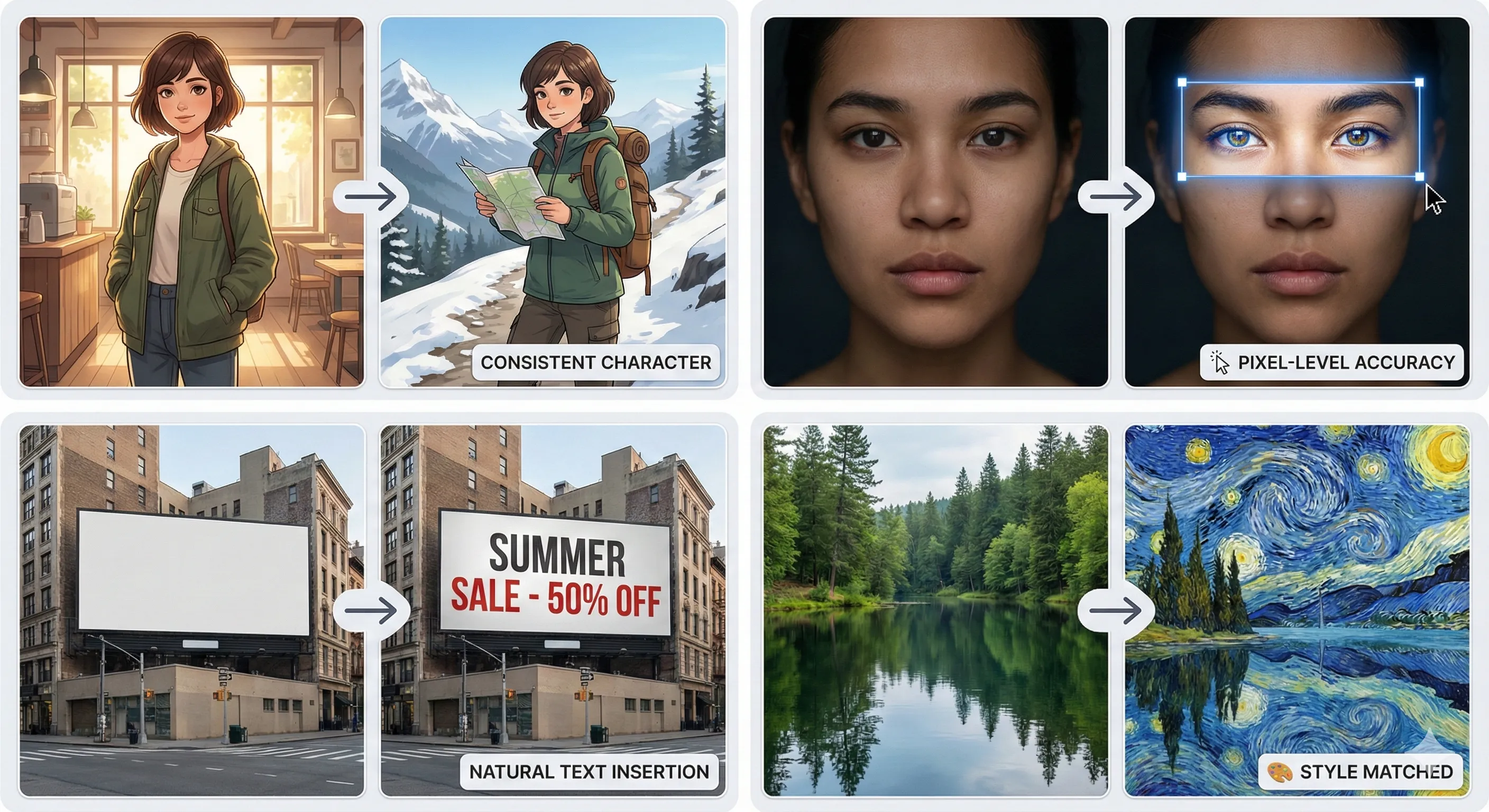
AI Image Editor makes it easier to edit photos online with natural prompts, faster cleanup, and a simpler workflow than traditional desktop tools.
What actually makes the best AI image editor?
The answer depends on how you use it, but the core standard is surprisingly simple. A good AI image editor should help you change an existing image without breaking the parts that matter.
That means the tool should understand plain instructions, preserve the original subject, and produce results that still look natural. If you ask for a background change, the lighting should still make sense. If you remove an object, the surrounding area should not look patched together. If you retouch a portrait, the face should still look like the same person.
In practical terms, the best AI image editor usually does a few things well:
- it follows natural language prompts
- it keeps important details consistent
- it handles common tasks like cleanup, retouching, enhancement, and background editing
- it produces usable results without a long learning curve
- it works directly in the browser, so you can edit quickly from any device
This is also why many people now prefer an AI image editor online instead of a traditional desktop workflow. They are not looking for more complexity. They are looking for a faster way to get good results.
Why the best tool is not always the most complicated one
A lot of users assume the best AI image editor must be the one with the deepest controls, the most settings, or the longest feature list. In reality, that is not always true.
For everyday editing, simplicity matters. If a tool lets you upload an image, describe the edit, and get a strong result in minutes, that is often more valuable than a platform that requires masking, layer work, or repeated manual corrections. Most people do not need a complicated setup just to clean a product image, retouch a portrait, or remove distractions from a photo.
That is especially true for creators, sellers, freelancers, and marketers who need to move quickly. In those situations, the best free AI image editor is often the one that removes steps from the process rather than adding more control than you will realistically use.
The best AI image editor for common use cases
The phrase "best AI image editor" sounds universal, but the better question is usually: best for what?
For background changes and image cleanup
If you are editing product photos, profile images, or marketing visuals, a strong tool should make it easy to replace backgrounds, remove unwanted objects, and clean up clutter without leaving obvious artifacts behind. This is where many editors fail. The result may look fine at first glance, but edges break, shadows disappear, or the subject loses realism.
A strong online AI image editor should keep the subject grounded in the scene, even after a major change.
For portrait retouching
Portrait editing needs a lighter touch. Skin should not look plastic, features should stay recognizable, and small improvements should feel invisible. The best AI image editor for portraits is usually one that helps refine the image without making it feel synthetic.
That balance matters more than dramatic before-and-after effects. Natural results are what people actually keep.
For prompt-based creative editing
One of the biggest reasons people search for an image editor AI is that they want to make changes with words instead of complex manual tools. That could mean changing clothing, adjusting a background, improving mood and lighting, or refining a scene without starting over.
This is where prompt quality and model behavior matter. A useful editor should understand specific requests and make controlled changes, not random ones. The more reliable the prompt-based workflow is, the more valuable the tool becomes over time.
For enhancement and sharper output
Not every edit is dramatic. Sometimes the job is simply to improve a soft image, recover detail, or prepare a photo for publishing. In those cases, the best AI image editor free experience is one that helps you improve quality without creating overprocessed textures or artificial sharpness.
Subtle enhancement is often more useful than exaggerated enhancement.
What to look for in a free online AI image editor
If you are comparing tools, there are a few things worth checking before you decide whether one is actually good.
First, test it on a real image rather than a perfect sample photo. Use something with hair, reflections, uneven lighting, busy backgrounds, or small details. That tells you much more than a polished demo.
Second, try a few practical prompts:
- remove an unwanted object
- change the background
- improve lighting
- retouch the subject
- sharpen the image without making it look fake
Third, pay attention to how much cleanup is still needed afterward. A tool can generate a visually impressive first result and still waste your time if every image needs manual correction before you can use it.
That is one reason many users now prefer a free online AI image editor that combines multiple editing tasks in one workflow. Instead of switching between separate tools for cleanup, retouching, and enhancement, they want one place where those edits can happen naturally.
So, what is the best AI image editor?
The honest answer is that the best AI image editor is the one that matches your real workflow, not the one with the biggest promises.
For some people, that means a fast browser-based editor for everyday photo cleanup. For others, it means a prompt-driven tool that can make targeted creative changes without destroying the original image. And for many users, the best option is the one that combines both: practical editing, simple controls, and enough flexibility to handle more than one kind of task.
If your goal is to edit existing photos online, make natural changes with prompts, and avoid a heavy desktop process, it makes sense to start with a tool built for that exact use case. You can explore that workflow directly on the AI Image Editor homepage and see how it performs on your own images instead of relying on generic marketing claims.
Final thoughts
People often search for "best AI image editor," "best free AI image editor," or "AI image editor online" as if there must be one universal winner. In practice, the better question is much simpler: which tool helps you get a clean, believable result with the least wasted effort?
That is what separates a genuinely useful editor from a trendy one. The best tool should help you work faster, keep the important details intact, and make editing feel lighter instead of more complicated. Once a tool can do that consistently, it stops being something you test once and becomes something you actually return to.